
dev-tools · folio
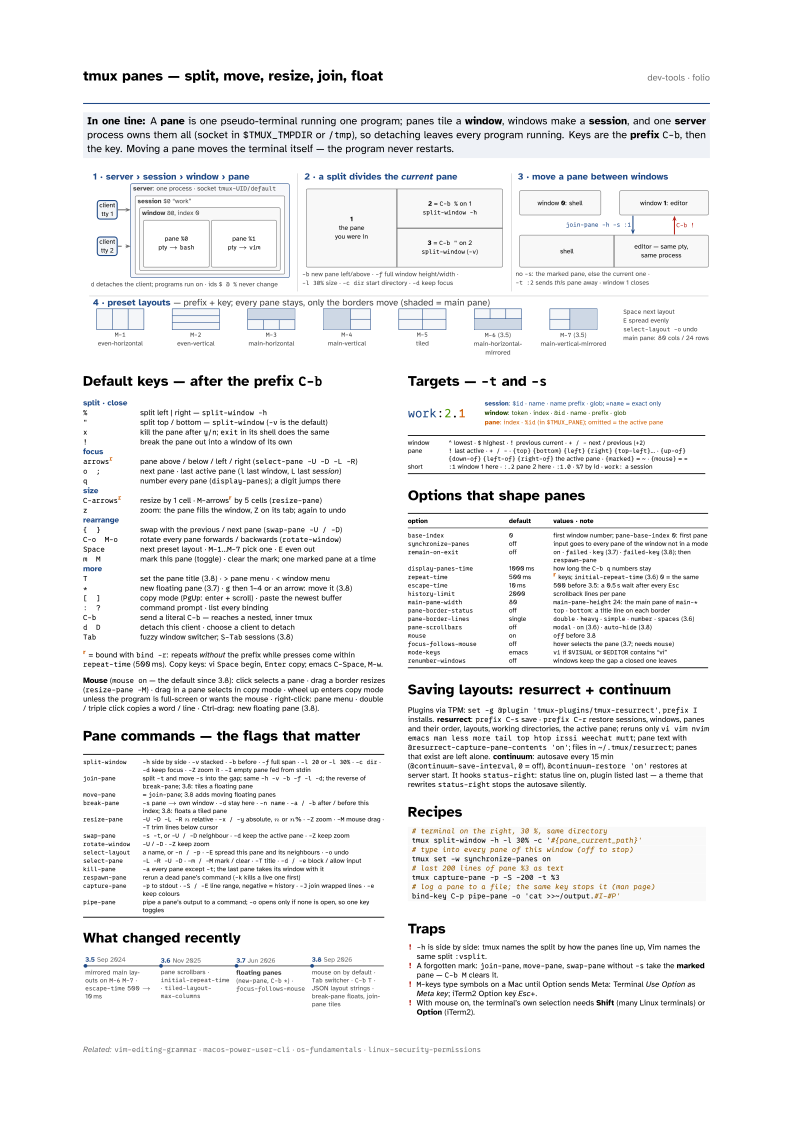
In one line: A pane is one pseudo-terminal running one program; panes tile a
window, windows make a session, and one server process owns them
all (socket in $TMUX_TMPDIR or /tmp), so detaching leaves every program running.
Keys are the prefix C-b, then the key. Moving a pane moves the terminal itself —
the program never restarts.
Download PDF Print view LaTeX source

Default keys — after the prefix C-b
split · close | split left | right — split-window -h |
" | split top / bottom — split-window (-v is the default) |
x | kill the pane after y/n; exit in its shell does the same |
! | break the pane out into a window of its own |
focus | pane above / below / left / right (select-pane -U -D -L -R) |
o ; | next pane · last active pane (l last window, L last session) |
q | number every pane (display-panes); a digit jumps there |
size | resize by 1 cell · M-arrowsr by 5 cells (resize-pane) |
z | zoom: the pane fills the window, Z on its tab; again to undo |
rearrange | swap with the previous / next pane (swap-pane -U / -D) |
C-o M-o | rotate every pane forwards / backwards (rotate-window) |
Space | next preset layout · M-1…M-7 pick one · E even out |
m M | mark this pane (toggle) · clear the mark; one marked pane at a time |
more | set the pane title (3.8) · > pane menu · < window menu |
* | new floating pane (3.7) · g then 1–4 or an arrow: move it (3.8) |
[ ] | copy mode (PgUp: enter + scroll) · paste the newest buffer |
: ? | command prompt · list every binding |
C-b | send a literal C-b — reaches a nested, inner tmux |
d D | detach this client · choose a client to detach |
Tab | fuzzy window switcher; S-Tab sessions (3.8) |
r = bound with bind -r: repeats without the prefix while presses come within repeat-time (500 ms). Copy keys: vi Space begin, Enter copy; emacs C-Space, M-w.
Mouse (mouse on — the default since 3.8): click selects a pane · drag a border resizes (resize-pane -M) · drag in a pane selects in copy mode · wheel up enters copy mode unless the program is full-screen or wants the mouse · right-click: pane menu · double / triple click copies a word / line · Ctrl-drag: new floating pane (3.8).
Pane commands — the flags that matter
split-window | -h side by side · -v stacked · -b before · -f full span · -l 20 or -l 30% · -c dir · -d keep focus · -Z zoom it · -I empty pane fed from stdin |
join-pane | split -t and move -s into the gap; same -h -v -b -f -l -d; the reverse of break-pane; 3.8: tiles a floating pane |
move-pane | = join-pane; 3.8 adds moving floating panes |
break-pane | -s pane → own window · -d stay here · -n name · -a / -b after / before this index; 3.8: floats a tiled pane |
resize-pane | -U -D -L -R n relative · -x / -y absolute, n or n% · -Z zoom · -M mouse drag · -T trim lines below cursor |
swap-pane | -s -t, or -U / -D neighbour · -d keep the active pane · -Z keep zoom |
rotate-window | -U / -D · -Z keep zoom |
select-layout | a name, or -n / -p · -E spread this pane and its neighbours · -o undo |
select-pane | -L -R -U -D · -m / -M mark / clear · -T title · -d / -e block / allow input |
kill-pane | -a every pane except -t; the last pane takes its window with it |
respawn-pane | rerun a dead pane’s command (-k kills a live one first) |
capture-pane | -p to stdout · -S / -E line range, negative = history · -J join wrapped lines · -e keep colours |
pipe-pane | pipe a pane’s output to a command; -o opens only if none is open, so one key toggles |
What changed recently

Targets — -t and -s

| window | ^ lowest · $ highest · ! previous current · + / - next / previous (+2) |
| pane | ! last active · + / - · {top} {bottom} {left} {right} {top-left}… · {up-of} {down-of} {left-of} {right-of} the active pane · {marked} = ~ · {mouse} = = |
| short | :1 window 1 here · :.2 pane 2 here · :1.0 · %7 by id · work: a session |
Options that shape panes
option | default | values · note |
|---|---|---|
base-index | 0 | first window number; pane-base-index 0: first pane |
synchronize-panes | off | input goes to every pane of the window not in a mode |
remain-on-exit | off | on · failed · key (3.7) · failed-key (3.8); then respawn-pane |
display-panes-time | 1000 ms | how long the C-b q numbers stay |
repeat-time | 500 ms | r keys; initial-repeat-time (3.6) 0 = the same |
escape-time | 10 ms | 500 before 3.5: a 0.5 s wait after every Esc |
history-limit | 2000 | scrollback lines per pane |
main-pane-width | 80 | main-pane-height 24: the main pane of main-* |
pane-border-status | off | top · bottom: a title line on each border |
pane-border-lines | single | double · heavy · simple · number · spaces (3.6) |
pane-scrollbars | off | modal · on (3.6) · auto-hide (3.8) |
mouse | on | off before 3.8 |
focus-follows-mouse | off | hover selects the pane (3.7; needs mouse) |
mode-keys | emacs | vi if $VISUAL or $EDITOR contains “vi” |
renumber-windows | off | windows keep the gap a closed one leaves |
Saving layouts: resurrect + continuum
Plugins via TPM: set -g @plugin 'tmux-plugins/tmux-resurrect', prefix I installs. resurrect: prefix C-s save · prefix C-r restore sessions, windows, panes and their order, layouts, working directories, the active pane; reruns only vi vim nvim emacs
man less more tail top htop irssi weechat mutt; pane text with @resurrect-capture-pane-contents 'on'; files in ~/.tmux/resurrect; panes that exist are left alone. continuum: autosave every 15 min (@continuum-save-interval, 0 = off), @continuum-restore 'on' restores at server start. It hooks status-right: status line on, plugin listed last — a theme that rewrites status-right stops the autosave silently.
Recipes
# terminal on the right, 30 %, same directory
tmux split-window -h -l 30% -c '#{pane_current_path}'
# type into every pane of this window (off to stop)
tmux set -w synchronize-panes on
# last 200 lines of pane %3 as text
tmux capture-pane -p -S -200 -t %3
# log a pane to a file; the same key stops it (man page)
bind-key C-p pipe-pane -o 'cat >>~/output.#I-#P'
Traps
-his side by side: tmux names the split by how the panes line up, Vim names the same split:vsplit.- A forgotten mark:
join-pane,move-pane,swap-panewithout-stake the marked pane —C-b Mclears it. M-keys type symbols on a Mac until Option sends Meta: Terminal Use Option as Meta key; iTerm2 Option key Esc+.- With mouse on, the terminal’s own selection needs Shift (many Linux terminals) or Option (iTerm2).