
ios-platform · folio
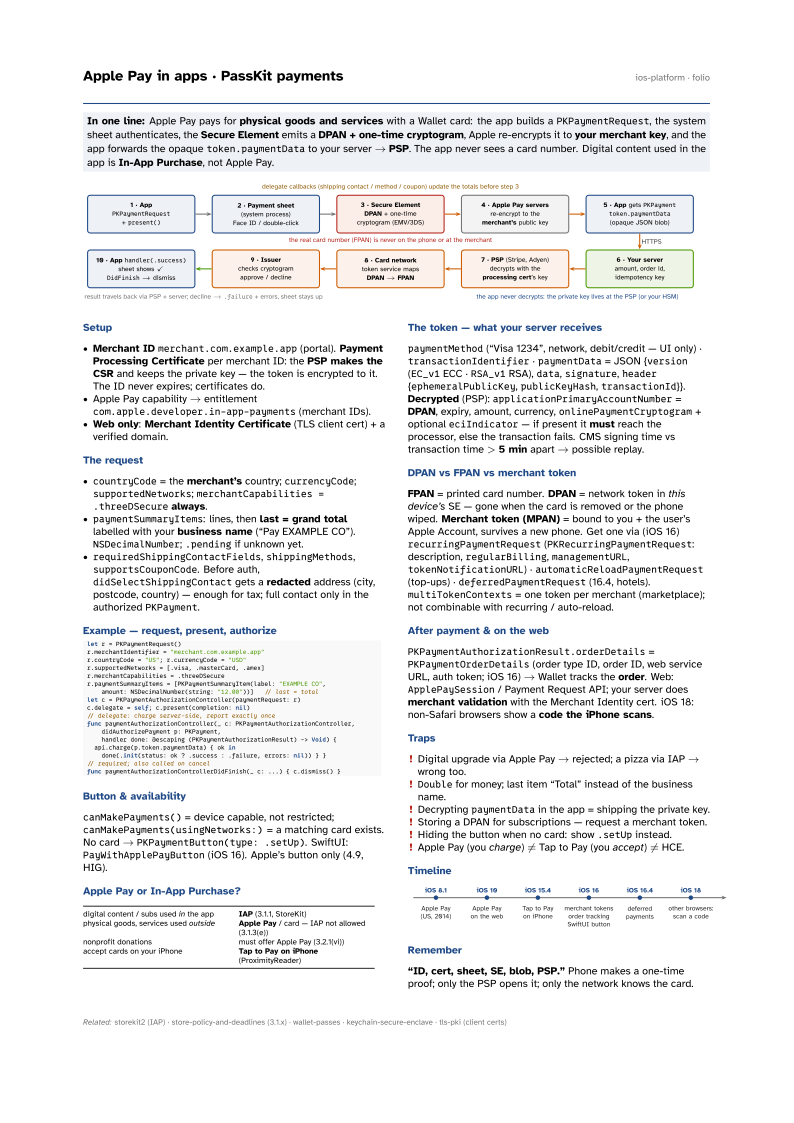
In one line: Apple Pay pays for physical goods and services with a Wallet card: the app builds a
PKPaymentRequest, the system sheet authenticates, the Secure Element emits a
DPAN + one-time cryptogram, Apple re-encrypts it to your merchant key, and the app
forwards the opaque token.paymentData to your server → PSP. The app never sees a card
number. Digital content used in the app is In-App Purchase, not Apple Pay.
Download PDF Print view LaTeX source

Setup
- Merchant ID
merchant.com.example.app(portal). Payment Processing Certificate per merchant ID: the PSP makes the CSR and keeps the private key — the token is encrypted to it. The ID never expires; certificates do. - Apple Pay capability → entitlement
com.apple.developer.in-app-payments(merchant IDs). - Web only: Merchant Identity Certificate (TLS client cert) + a verified domain.
The request
countryCode= the merchant’s country;currencyCode;supportedNetworks;merchantCapabilities = .threeDSecurealways.paymentSummaryItems: lines, then last = grand total labelled with your business name (“Pay EXAMPLE CO”).NSDecimalNumber;.pendingif unknown yet.requiredShippingContactFields,shippingMethods,supportsCouponCode. Before auth,didSelectShippingContactgets a redacted address (city, postcode, country) — enough for tax; full contact only in the authorizedPKPayment.
Example — request, present, authorize
let r = PKPaymentRequest()
r.merchantIdentifier = "merchant.com.example.app"
r.countryCode = "US"; r.currencyCode = "USD"
r.supportedNetworks = [.visa, .masterCard, .amex]
r.merchantCapabilities = .threeDSecure
r.paymentSummaryItems = [PKPaymentSummaryItem(label: "EXAMPLE CO",
    amount: NSDecimalNumber(string: "12.00"))]   // last = total
let c = PKPaymentAuthorizationController(paymentRequest: r)
c.delegate = self; c.present(completion: nil)
// delegate: charge server-side, report exactly once
func paymentAuthorizationController(_ c: PKPaymentAuthorizationController,
    didAuthorizePayment p: PKPayment,
    handler done: @escaping (PKPaymentAuthorizationResult) -> Void) {
  api.charge(p.token.paymentData) { ok in
    done(.init(status: ok ? .success : .failure, errors: nil)) } }
// required; also called on cancel
func paymentAuthorizationControllerDidFinish(_ c: ...) { c.dismiss() }
Button & availability
canMakePayments() = device capable, not restricted; canMakePayments(usingNetworks:) = a matching card exists. No card → PKPaymentButton(type: .setUp). SwiftUI: PayWithApplePayButton (iOS 16). Apple’s button only (4.9, HIG).
Apple Pay or In-App Purchase?
| digital content / subs used in the app | IAP (3.1.1, StoreKit) |
| physical goods, services used outside | Apple Pay / card — IAP not allowed (3.1.3(e)) |
| nonprofit donations | must offer Apple Pay (3.2.1(vi)) |
| accept cards on your iPhone | Tap to Pay on iPhone (ProximityReader) |
The token — what your server receives
paymentMethod (“Visa 1234”, network, debit/credit — UI only) · transactionIdentifier · paymentData = JSON {version (EC_v1 ECC · RSA_v1 RSA), data, signature, header {ephemeralPublicKey, publicKeyHash, transactionId}}. Decrypted (PSP): applicationPrimaryAccountNumber = DPAN, expiry, amount, currency, onlinePaymentCryptogram + optional eciIndicator — if present it must reach the processor, else the transaction fails. CMS signing time vs transaction time > 5 min apart → possible replay.
DPAN vs FPAN vs merchant token
FPAN = printed card number. DPAN = network token in this device’s SE — gone when the card is removed or the phone wiped. Merchant token (MPAN) = bound to you + the user’s Apple Account, survives a new phone. Get one via (iOS 16) recurringPaymentRequest (PKRecurringPaymentRequest: description, regularBilling, managementURL, tokenNotificationURL) · automaticReloadPaymentRequest (top-ups) · deferredPaymentRequest (16.4, hotels). multiTokenContexts = one token per merchant (marketplace); not combinable with recurring / auto-reload.
After payment & on the web
PKPaymentAuthorizationResult.orderDetails = PKPaymentOrderDetails (order type ID, order ID, web service URL, auth token; iOS 16) → Wallet tracks the order. Web: ApplePaySession / Payment Request API; your server does merchant validation with the Merchant Identity cert. iOS 18: non-Safari browsers show a code the iPhone scans.
Traps
- Digital upgrade via Apple Pay → rejected; a pizza via IAP → wrong too.
Doublefor money; last item “Total” instead of the business name.- Decrypting
paymentDatain the app = shipping the private key. - Storing a DPAN for subscriptions — request a merchant token.
- Hiding the button when no card: show
.setUpinstead. - Apple Pay (you charge) ≠ Tap to Pay (you accept) ≠ HCE.
Timeline

Remember
“ID, cert, sheet, SE, blob, PSP.” Phone makes a one-time proof; only the PSP opens it; only the network knows the card.