
ios-platform · folio
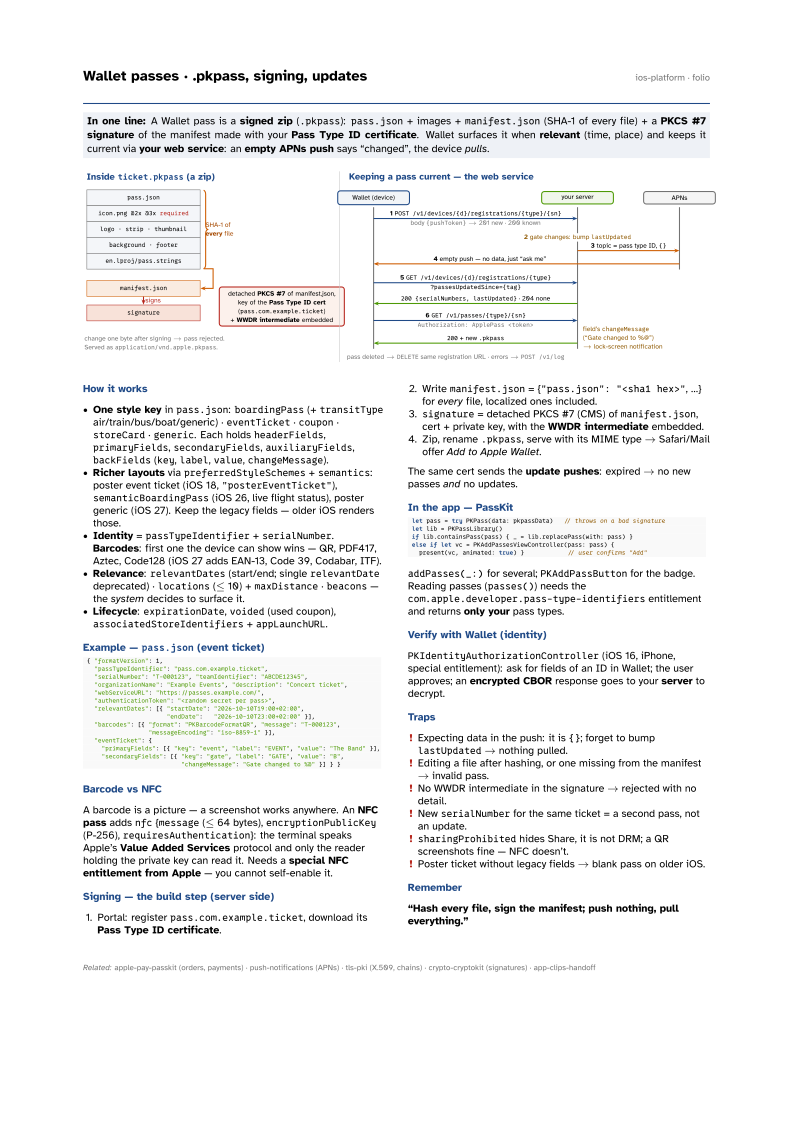
In one line: A Wallet pass is a signed zip (.pkpass): pass.json + images +
manifest.json (SHA-1 of every file) + a PKCS #7 signature of the manifest made with your
Pass Type ID certificate. Wallet surfaces it when relevant (time, place) and keeps it
current via your web service: an empty APNs push says “changed”, the device pulls.
Download PDF Print view LaTeX source

How it works
- One style key in
pass.json:boardingPass(+transitTypeair/train/bus/boat/generic) ·eventTicket·coupon·storeCard·generic. Each holdsheaderFields,primaryFields,secondaryFields,auxiliaryFields,backFields(key,label,value,changeMessage). - Richer layouts via
preferredStyleSchemes+semantics: poster event ticket (iOS 18,"posterEventTicket"),semanticBoardingPass(iOS 26, live flight status), poster generic (iOS 27). Keep the legacy fields — older iOS renders those. - Identity =
passTypeIdentifier+serialNumber. Barcodes: first one the device can show wins — QR, PDF417, Aztec, Code128 (iOS 27 adds EAN-13, Code 39, Codabar, ITF). - Relevance:
relevantDates(start/end; singlerelevantDatedeprecated) ·locations(≤ 10) +maxDistance·beacons— the system decides to surface it. - Lifecycle:
expirationDate,voided(used coupon),associatedStoreIdentifiers+appLaunchURL.
Example — pass.json (event ticket)
{ "formatVersion": 1,
  "passTypeIdentifier": "pass.com.example.ticket",
  "serialNumber": "T-000123", "teamIdentifier": "ABCDE12345",
  "organizationName": "Example Events", "description": "Concert ticket",
  "webServiceURL": "https://passes.example.com/",
  "authenticationToken": "<random secret per pass>",
  "relevantDates": [{ "startDate": "2026-10-10T19:00+02:00",
                      "endDate":   "2026-10-10T23:00+02:00" }],
  "barcodes": [{ "format": "PKBarcodeFormatQR", "message": "T-000123",
                 "messageEncoding": "iso-8859-1" }],
  "eventTicket": {
    "primaryFields": [{ "key": "event", "label": "EVENT", "value": "The Band" }],
    "secondaryFields": [{ "key": "gate", "label": "GATE", "value": "B",
                          "changeMessage": "Gate changed to %@" }] } }
Barcode vs NFC
A barcode is a picture — a screenshot works anywhere. An NFC pass adds nfc {message (≤ 64 bytes), encryptionPublicKey (P-256), requiresAuthentication}: the terminal speaks Apple’s Value Added Services protocol and only the reader holding the private key can read it. Needs a special NFC entitlement from Apple — you cannot self-enable it.
Signing — the build step (server side)
- Portal: register
pass.com.example.ticket, download its Pass Type ID certificate. - Write
manifest.json= {"pass.json": "<sha1 hex>", …} for every file, localized ones included. signature= detached PKCS #7 (CMS) ofmanifest.json, cert + private key, with the WWDR intermediate embedded.- Zip, rename
.pkpass, serve with its MIME type → Safari/Mail offer Add to Apple Wallet.
The same cert sends the update pushes: expired → no new passes and no updates.
In the app — PassKit
let pass = try PKPass(data: pkpassData)   // throws on a bad signature
let lib = PKPassLibrary()
if lib.containsPass(pass) { _ = lib.replacePass(with: pass) }
else if let vc = PKAddPassesViewController(pass: pass) {
  present(vc, animated: true) }            // user confirms "Add"
addPasses(_:) for several; PKAddPassButton for the badge. Reading passes (passes()) needs the com.apple.developer.pass-type-identifiers entitlement and returns only your pass types.
Verify with Wallet (identity)
PKIdentityAuthorizationController (iOS 16, iPhone, special entitlement): ask for fields of an ID in Wallet; the user approves; an encrypted CBOR response goes to your server to decrypt.
Traps
- Expecting data in the push: it is
{}; forget to bumplastUpdated→ nothing pulled. - Editing a file after hashing, or one missing from the manifest → invalid pass.
- No WWDR intermediate in the signature → rejected with no detail.
- New
serialNumberfor the same ticket = a second pass, not an update. sharingProhibitedhides Share, it is not DRM; a QR screenshots fine — NFC doesn’t.- Poster ticket without legacy fields → blank pass on older iOS.