
react-native · folio
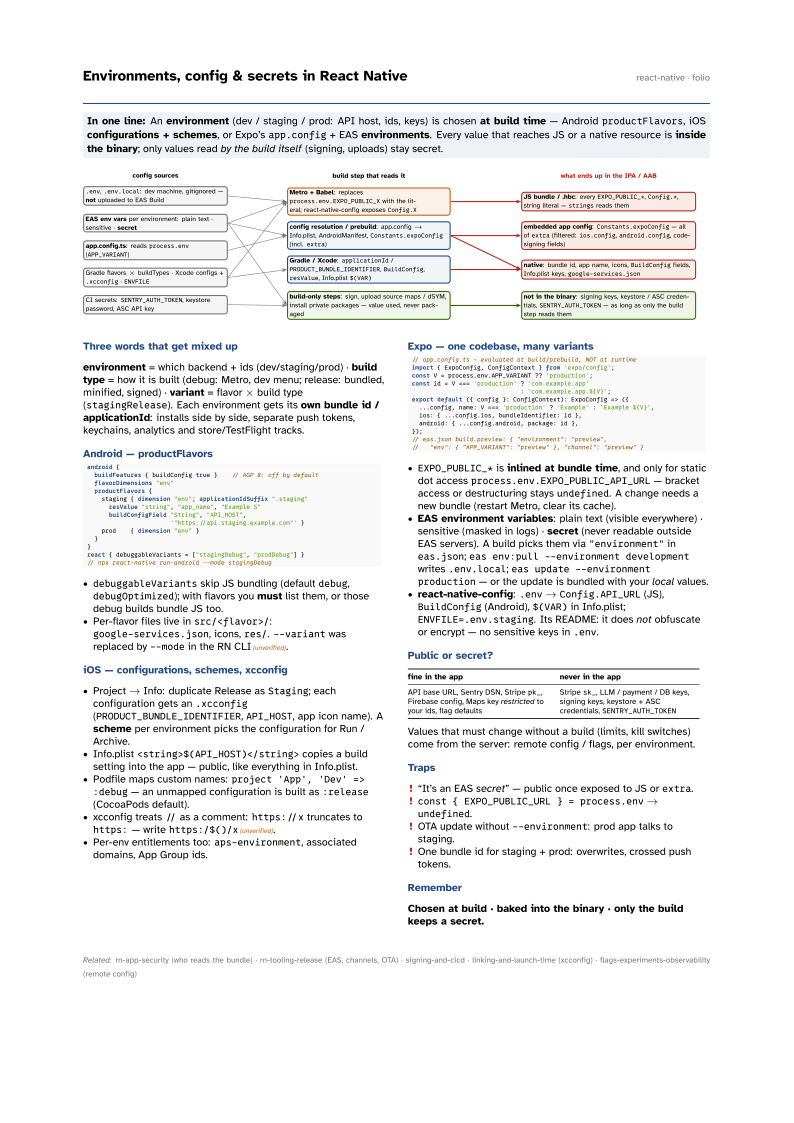
In one line: An environment (dev / staging / prod: API host, ids, keys) is chosen at build
time — Android productFlavors, iOS configurations + schemes, or Expo’s
app.config + EAS environments. Every value that reaches JS or a native resource is
inside the binary; only values read by the build itself (signing, uploads) stay secret.
Download PDF Print view LaTeX source

Three words that get mixed up
environment = which backend + ids (dev/staging/prod) · build type = how it is built (debug: Metro, dev menu; release: bundled, minified, signed) · variant = flavor × build type (stagingRelease). Each environment gets its own bundle id / applicationId: installs side by side, separate push tokens, keychains, analytics and store/TestFlight tracks.
Android — productFlavors
android {
  buildFeatures { buildConfig true }    // AGP 8: off by default
  flavorDimensions "env"
  productFlavors {
    staging { dimension "env"; applicationIdSuffix ".staging"
      resValue "string", "app_name", "Example S"
      buildConfigField "String", "API_HOST",
                       '"https://api.staging.example.com"' }
    prod    { dimension "env" }
  }
}
react { debuggableVariants = ["stagingDebug", "prodDebug"] }
// npx react-native run-android --mode stagingDebugdebuggableVariantsskip JS bundling (defaultdebug,debugOptimized); with flavors you must list them, or those debug builds bundle JS too.- Per-flavor files live in
src/<flavor>/:google-services.json, icons,res/.--variantwas replaced by--modein the RN CLI(unverified).
iOS — configurations, schemes, xcconfig
- Project → Info: duplicate Release as
Staging; each configuration gets an.xcconfig(PRODUCT_BUNDLE_IDENTIFIER,API_HOST, app icon name). A scheme per environment picks the configuration for Run / Archive. - Info.plist
<string>$(API_HOST)</string>copies a build setting into the app — public, like everything in Info.plist. - Podfile maps custom names:
project 'App', 'Dev' => :debug— an unmapped configuration is built as:release(CocoaPods default). - xcconfig treats
//as a comment:https://xtruncates tohttps:— writehttps:/$()/x(unverified). - Per-env entitlements too:
aps-environment, associated domains, App Group ids.
Expo — one codebase, many variants
// app.config.ts - evaluated at build/prebuild, NOT at runtime
import { ExpoConfig, ConfigContext } from 'expo/config';
const V = process.env.APP_VARIANT ?? 'production';
const id = V === 'production' ? 'com.example.app'
                              : `com.example.app.${V}`;
export default ({ config }: ConfigContext): ExpoConfig => ({
  ...config, name: V === 'production' ? 'Example' : `Example ${V}`,
  ios: { ...config.ios, bundleIdentifier: id },
  android: { ...config.android, package: id },
});
// eas.json build.preview: { "environment": "preview",
// "env": { "APP_VARIANT": "preview" }, "channel": "preview" }EXPO_PUBLIC_*is inlined at bundle time, and only for static dot accessprocess.env.EXPO_PUBLIC_API_URL— bracket access or destructuring staysundefined. A change needs a new bundle (restart Metro, clear its cache).- EAS environment variables: plain text (visible everywhere) · sensitive (masked in logs) · secret (never readable outside EAS servers). A build picks them via
"environment"ineas.json;eas env:pull --environment developmentwrites.env.local;eas update --environment production— or the update is bundled with your local values. - react-native-config:
.env→Config.API_URL(JS),BuildConfig(Android),$(VAR)in Info.plist;ENVFILE=.env.staging. Its README: it does not obfuscate or encrypt — no sensitive keys in.env.
Public or secret?
| fine in the app | never in the app |
|---|---|
API base URL, Sentry DSN, Stripe pk_, Firebase config, Maps key restricted to your
ids, flag defaults | Stripe sk_, LLM / payment / DB keys, signing keys, keystore + ASC
credentials, SENTRY_AUTH_TOKEN |
Values that must change without a build (limits, kill switches) come from the server: remote config / flags, per environment.
Traps
- “It’s an EAS secret” — public once exposed to JS or
extra. const { EXPO_PUBLIC_URL } = process.env→undefined.- OTA update without
--environment: prod app talks to staging. - One bundle id for staging + prod: overwrites, crossed push tokens.